Walking Pad Buying Guide: What to Look for in 2026

By Walking Pad Picks Editorial Team
A walking pad buying guide should cover eight key features: motor power, belt size, weight capacity, noise level, folding design, speed range, controls, and price tier. Getting even one wrong means a pad that collects dust. This guide breaks down what to check — and what to avoid — before you buy.
Why This Guide Exists
The walking pad market exploded between 2023 and 2026. What was once a niche product — a flat, compact treadmill designed for walking under a desk — is now a crowded category with hundreds of models from dozens of brands. Prices range from $89 to $800+. Feature lists range from "bare bones belt with an on/off switch" to "app-connected, incline-adjustable, AI-coached smart pad."
This is a problem for buyers.
Most people shopping for a walking pad are desk workers who want to move more during the workday. They are not fitness equipment experts. They search "best walking pad," see a wall of Amazon listings with nearly identical photos and suspiciously similar 4.5-star ratings, and either buy the cheapest one (which often breaks in three months) or the most-reviewed one (which may not suit their needs).
The health case for walking pads is well-established. Prolonged sitting increases the risk of cardiovascular disease, type 2 diabetes, and all-cause mortality. Walking — even at slow, casual speeds — reverses many of these effects. A 2024 meta-analysis in the British Journal of Sports Medicine found that even 4,000 steps per day significantly reduces all-cause mortality risk. A walking pad under a desk makes it possible to accumulate 8,000–12,000 steps during a standard workday without setting aside dedicated exercise time.
But the pad itself has to work. A loud motor disrupts video calls. A narrow belt makes you walk with an unnatural gait. A low weight capacity burns out the motor in months. A pad that does not fold sits in the middle of your floor permanently.
This guide cuts through the marketing noise. We break down the eight features that actually matter, explain what specs to look for at each price point, flag the red flags that signal a bad purchase, and help you match the right tier to your specific situation.
The difference between a walking pad you use daily and one that collects dust comes down to eight measurable features.
The 8 Key Features to Look For
Every walking pad — from a $100 no-name to a $700 premium model — can be evaluated on these eight features. Understanding what each one means and what numbers to look for will prevent 90% of bad purchases.
1. Motor Power
Motor power is the single most important spec on a walking pad. It determines how smoothly the belt moves, how well the pad handles your weight over time, and how quickly the motor wears out.
Continuous HP vs Peak HP
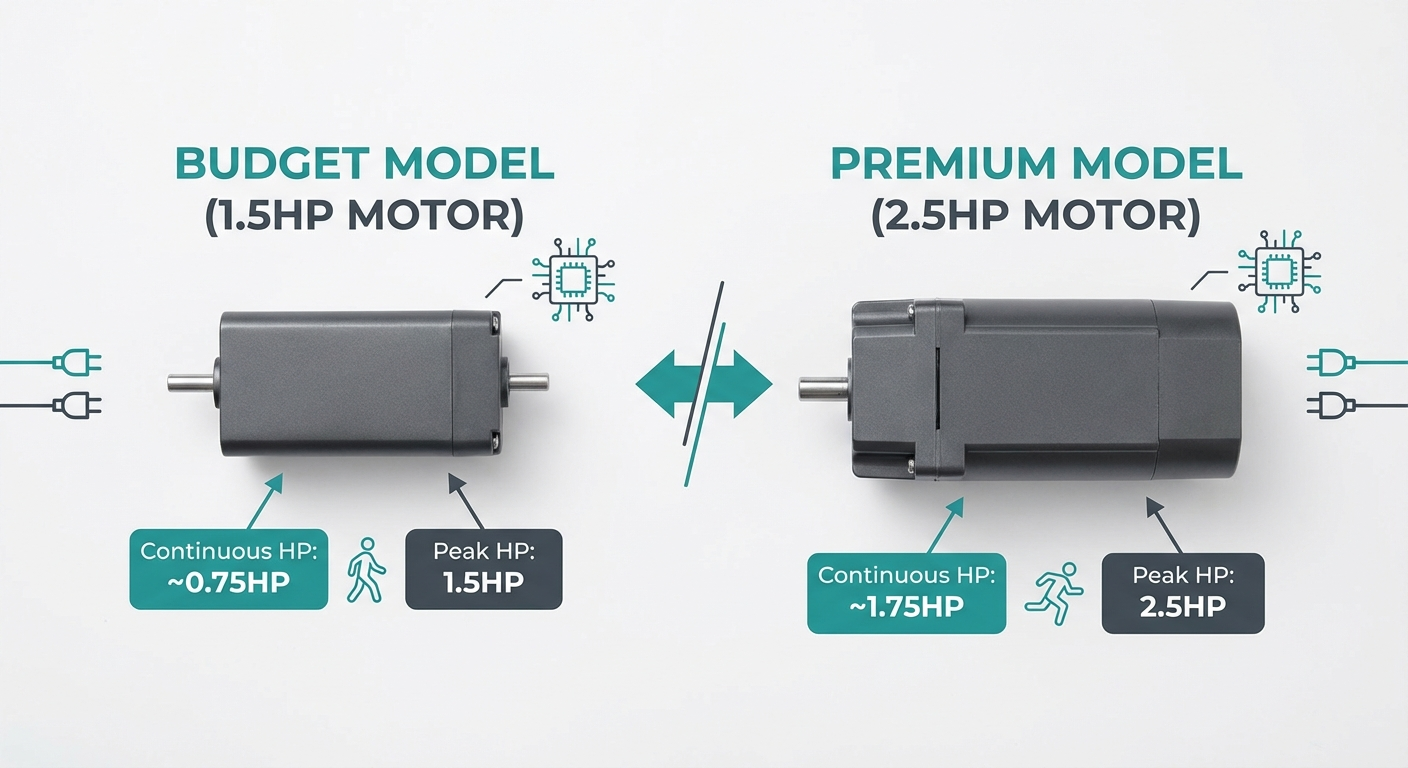
Walking pad listings show two numbers: peak horsepower and continuous horsepower. Peak HP is the maximum output the motor can produce for a brief burst — typically during startup or a sudden speed change. Continuous HP (also called CHP or rated HP) is what the motor sustains during normal operation.
Continuous HP is the number that matters. Peak HP is a marketing number. A motor rated at "2.5 HP peak / 1.0 HP continuous" will perform worse than a "2.0 HP peak / 1.5 HP continuous" motor during sustained walking.
What to look for:
| Use Case | Minimum Continuous HP |
|---|---|
| Light walking (<30 min/day, under 160 lbs) | 1.0 HP |
| Daily desk walking (1–3 hours, under 200 lbs) | 1.5–2.0 HP |
| Heavy daily use (3+ hours, 200+ lbs) | 2.0–2.5 HP |
| Jogging capability (up to 6 mph) | 2.5+ HP |
A motor running at or near its continuous rating for extended periods will overheat. If you plan to walk 2+ hours per day, you want a motor whose continuous rating exceeds what you actually need. Think of it like a car engine — you do not want to drive at redline all day.
Warning signs of an underpowered motor:
- Belt slows noticeably when you step on it
- Motor gets hot to the touch after 20–30 minutes
- Inconsistent belt speed (micro-stutters while walking)
- Loud humming or whining under load
If a listing only shows peak HP and does not disclose continuous HP, that is a red flag. Reputable brands list both.
2. Belt Size
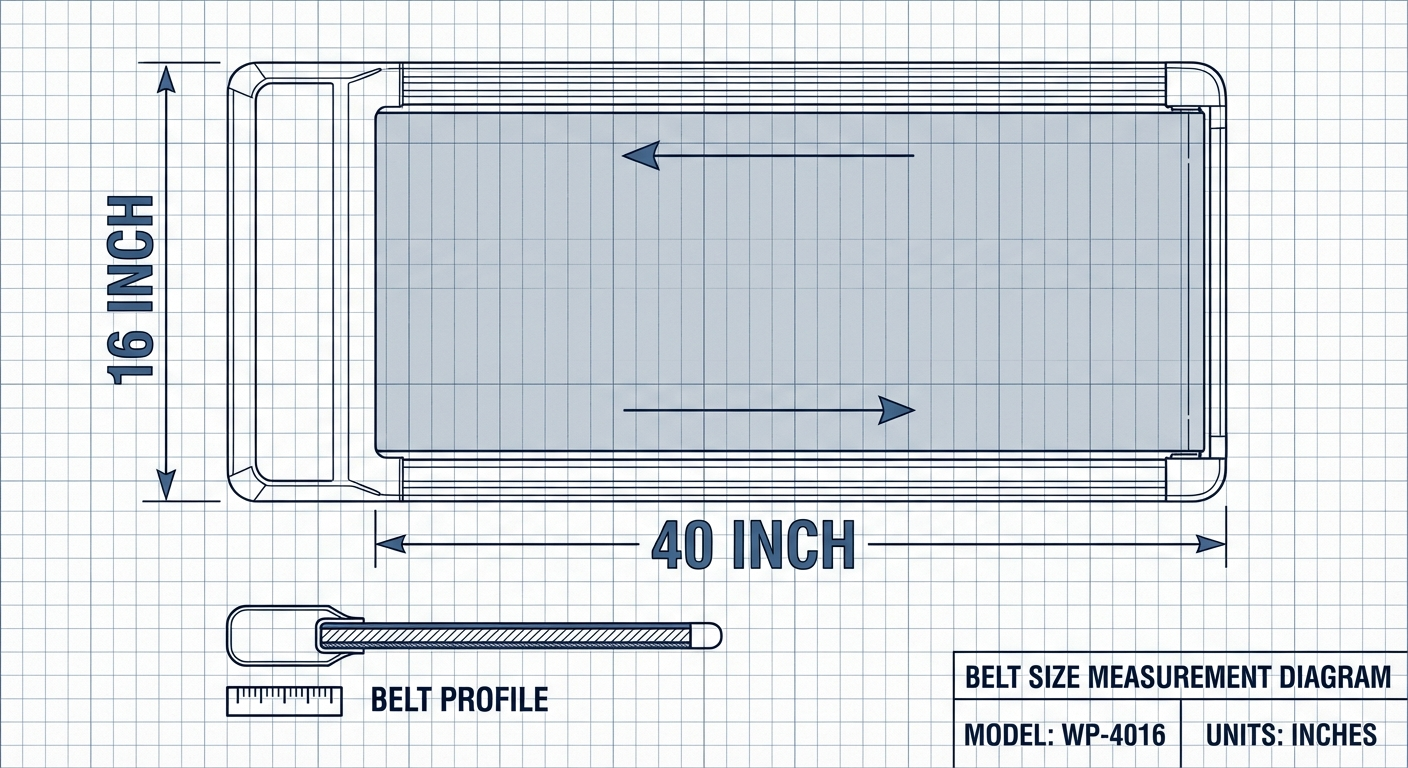
Belt size — the walking surface dimensions — directly affects your comfort and safety while walking. A belt that is too narrow or too short forces compensatory movement patterns that lead to discomfort, altered gait, and a higher risk of stepping off the edge.
Width
The minimum usable width for most adults is 16 inches. At this width, you must walk with a very precise, straight-line gait. Any natural hip sway or foot splay puts your foot near or over the edge.
For comfortable daily walking, 17–18 inches is the sweet spot. This allows a natural gait without consciously thinking about foot placement. Wider is always better, but widths above 20 inches are rare in the walking pad category (those are typically full treadmills).
Length
Belt length determines stride length. At walking speeds (1.5–3.0 mph), most adults have a stride length of 20–28 inches. A 40-inch belt accommodates this with margin. A 36-inch belt feels cramped for anyone over 5'8".
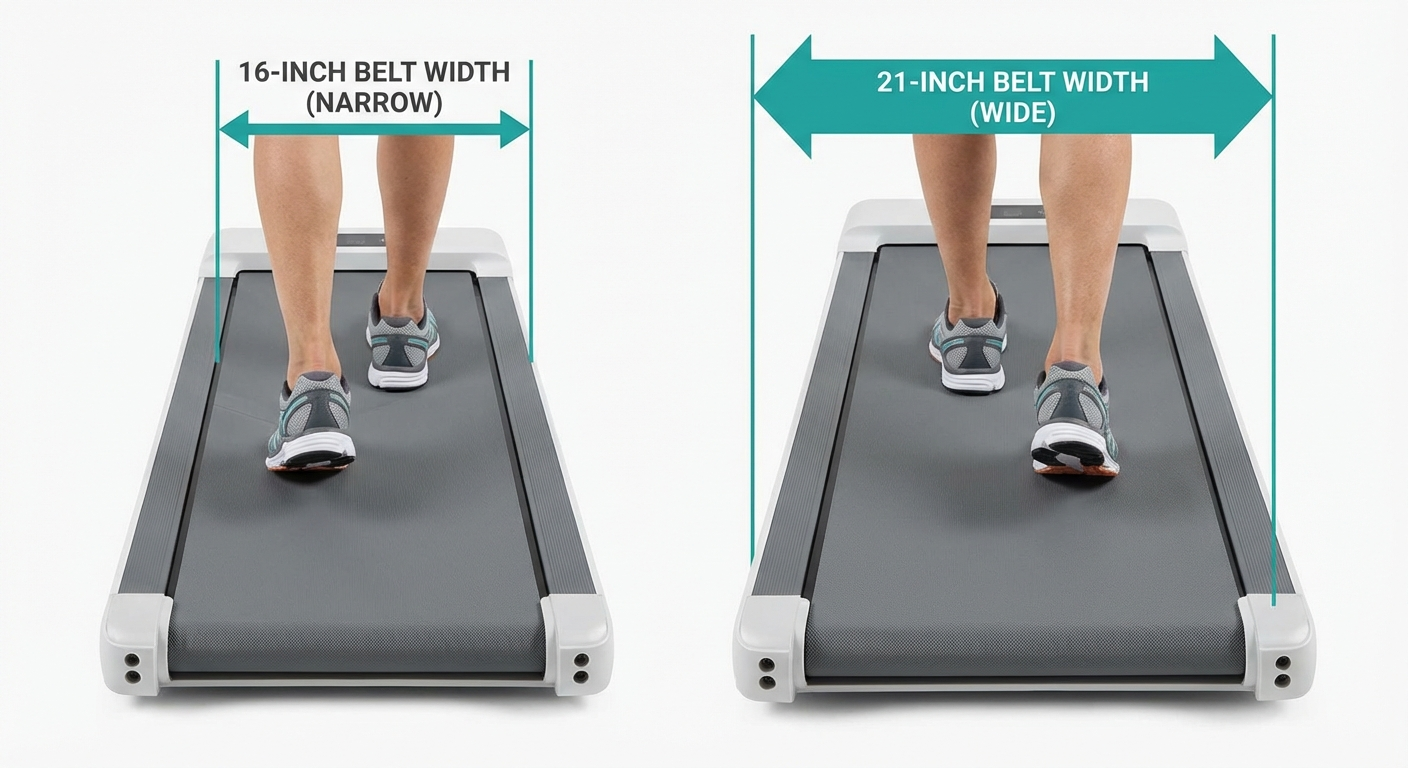
Left: 14-inch belt — notice how close the feet are to the edge. Right: 18-inch belt — natural walking gait with comfortable margin.
Recommended minimums by height:
| Your Height | Minimum Belt Width | Minimum Belt Length |
|---|---|---|
| Under 5'6" | 15.5 inches | 38 inches |
| 5'6"–5'10" | 16 inches | 40 inches |
| 5'10"–6'2" | 17 inches | 44 inches |
| Over 6'2" | 18+ inches | 48+ inches |
Do not trust product photos for belt size — they are often shot at angles that make narrow belts look wider. Always check the spec sheet dimensions.
3. Weight Capacity
Weight capacity is not just about whether the pad can hold you — it is about how long the pad will last under your weight with daily use.
The 20% Rule
Always choose a walking pad rated for at least 20% above your body weight. If you weigh 180 lbs, look for a 220+ lb capacity. If you weigh 250 lbs, look for 300+ lbs.
Why? Walking generates dynamic forces. Each step briefly loads the belt and motor with 1.1–1.3 times your static body weight. A 200-lb person generates roughly 220–260 lbs of force with each stride. If the pad is rated for exactly 200 lbs, the motor and belt are absorbing forces at or above their rated maximum with every single step.
Running near maximum capacity causes:
- Faster motor wear and overheating
- Increased belt friction and stretching
- Higher noise levels
- Reduced belt speed consistency
- Shorter overall product lifespan
Evidence note: This comparison uses manufacturer specifications, published research, and independently reported owner feedback. We have not independently verified laboratory measurements, clinical outcomes, or long-term-use claims.
Common capacity tiers:
| Capacity Range | Typical Price Range | Best For |
|---|---|---|
| 220 lbs | Under $200 | Users under 180 lbs |
| 265 lbs | $200–$400 | Users under 220 lbs |
| 300 lbs | $300–$500 | Users under 250 lbs |
| 350+ lbs | $400–$700 | Users under 290 lbs |
4. Noise Level
Noise is the most common complaint among walking pad owners — and the most common reason people stop using them. A loud walking pad disrupts video calls, annoys household members, and can cause noise complaints in apartments.
How Noise Is Measured
Walking pad noise is measured in decibels (dB). For context:
- 30 dB — whisper
- 40 dB — quiet library
- 50 dB — moderate rainfall
- 60 dB — normal conversation
- 70 dB — vacuum cleaner
Target: under 50 dB at walking speeds (1.5–3.0 mph). At this level, you can take video calls while walking without your microphone picking up the pad. Most quality walking pads hit 40–50 dB at 2.0 mph.
Factors that affect noise:
- Motor type: Brushless DC motors are quieter than brushed motors. If the listing does not specify motor type, it is probably brushed.
- Belt material: Multi-layer belts with cushioning absorb more footfall noise than thin, single-layer belts.
- Walking speed: Noise increases with speed. A pad that is 42 dB at 2.0 mph may hit 55 dB at 4.0 mph.
- Floor surface: Hard floors amplify vibration. An anti-vibration mat under the pad can reduce transmitted noise by 5–10 dB.
- Your weight: Heavier users generate more footfall noise and motor load noise.
Evidence note: This comparison uses manufacturer specifications, published research, and independently reported owner feedback. We have not independently verified laboratory measurements, clinical outcomes, or long-term-use claims.
5. Folding and Storage
Unless you have a dedicated home office where the walking pad lives permanently under a desk, storage matters. Walking pads that do not fold or are difficult to move become obstacles that get pushed into corners and eventually forgotten.
Fold Mechanisms
There are three main fold types:
-
Half-fold (hinged): The pad folds in half at the center, reducing its length by roughly 50%. Most common design. Folded dimensions are typically 20–26 inches long × 16–20 inches wide × 5–8 inches tall. Can stand upright against a wall or slide under a couch.
-
Non-folding (flat): Some ultra-slim walking pads (3–4 inches thick) skip the fold mechanism entirely. They slide under a bed, couch, or desk without folding. Works well if you have under-furniture clearance.
-
Partial fold (console fold): The display console or handlebar folds down, but the base stays flat. This reduces height but not length. Common on hybrid walking pad/treadmill models with handlebars.
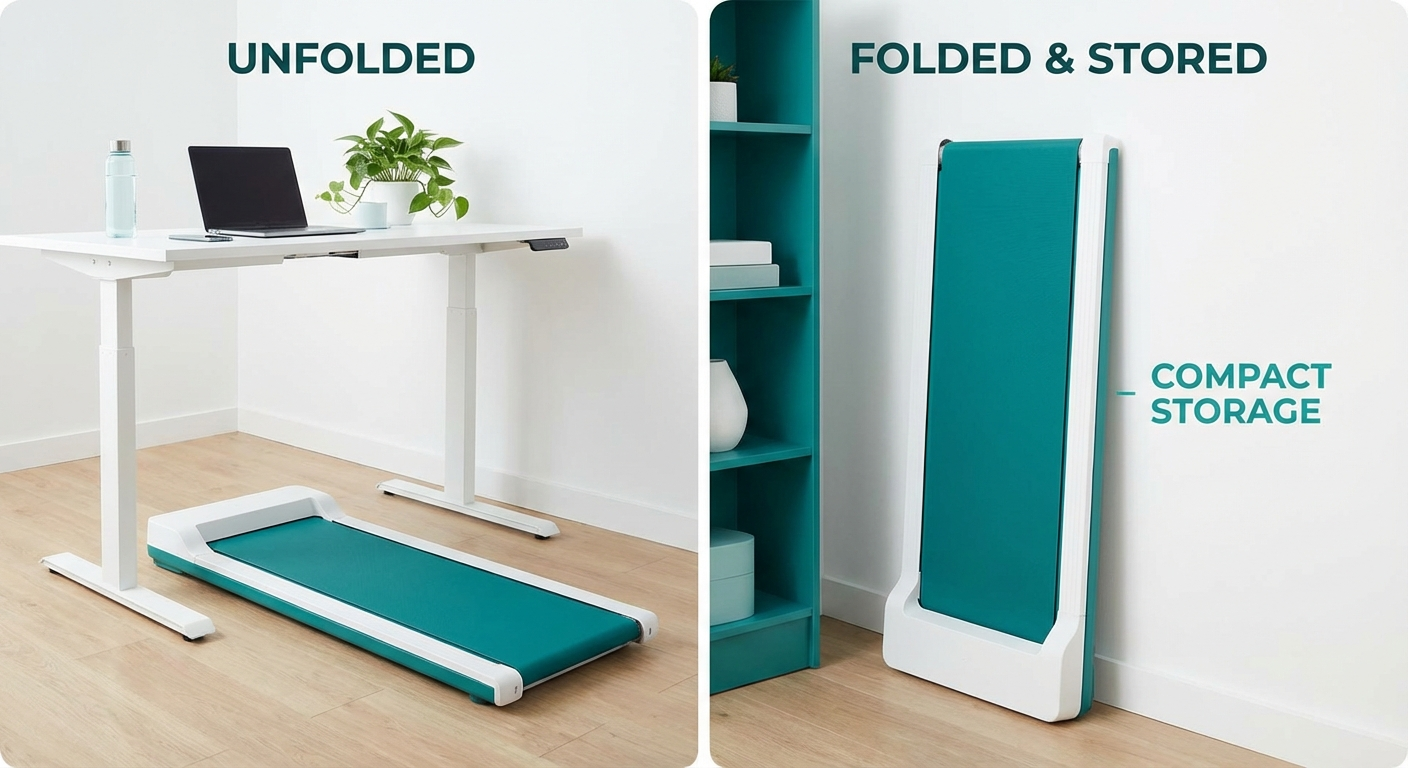
A half-fold walking pad stored upright takes roughly 2 square feet of floor space — about the same as a folding chair.
What to check:
- Folded dimensions — measure your intended storage space first
- Weight — walking pads range from 33 to 75+ lbs. If you need to carry it up stairs or between rooms, weight matters
- Transport wheels — built-in wheels make moving a heavy pad dramatically easier
- Fold lock — a latch or lock that secures the pad in the folded position prevents it from unfolding during transport or storage
6. Speed Range
Walking pads are designed for walking, not running. But the speed range still matters because it determines how versatile the pad is across different activities.
Speed by activity:
| Speed | Activity | Typical Use |
|---|---|---|
| 0.5–1.0 mph | Very slow stroll | Phone calls, reading, acclimation period |
| 1.0–2.0 mph | Casual walk | Desk work, typing, video calls |
| 2.0–3.0 mph | Brisk walk | Active work breaks, moderate exercise |
| 3.0–4.0 mph | Fast walk | Exercise-focused walking sessions |
| 4.0–6.0+ mph | Jog/run | Only on hybrid models with handlebars |
For desk walkers: A speed range of 0.5–4.0 mph covers everything you need. Most desk walking happens between 1.5–2.5 mph (see our Walking Pad Desk Setup Guide for optimal typing speeds).
Speed control granularity: Look for 0.1 mph increments, not 0.5 mph. The difference between 1.5 and 2.0 mph is significant when you are trying to find your comfortable typing speed. Pads with 0.5 mph increments limit your ability to dial in the perfect pace.
Minimum speed matters too. Some walking pads start at 1.0 mph — which may be too fast for a warm-up, for phone calls where you want movement without bounce, or for elderly users. A 0.5 mph minimum is ideal.
7. Display and Controls
How you interact with the walking pad during use affects your daily experience more than most people expect. Fumbling with a phone app to change speed by 0.5 mph while walking and typing is not practical.
Control methods:
-
Remote control (included with most pads): A small handheld or clip-on remote with speed up/down, start/stop, and mode buttons. This is the most practical control method for desk walking — keep it on your desk within arm's reach. Simple, reliable, no Bluetooth pairing issues.
-
Foot-speed sensor: Some pads detect your walking speed and adjust the belt automatically. Sounds convenient, but in practice the sensors can be imprecise — the belt speeds up when you intended to slow down, or vice versa. Mixed reviews from real users.
-
Phone app: Offers workout tracking, speed programs, and data logging. Useful for tracking weekly distance and calories but impractical for real-time speed adjustments while working. Consider app connectivity a bonus, not a primary control method.
-
Built-in display: An LED display on the pad showing current speed, time, distance, and calories. Useful but not essential if you have a remote. Some displays are hard to read at desk height (you are looking almost straight down).
What actually matters: A reliable remote control with responsive speed adjustment. Everything else is secondary. If the remote feels cheap, has Bluetooth lag, or requires line-of-sight IR aiming, daily use becomes frustrating.
8. Price Tiers
Walking pad pricing in 2026 clusters into three clear tiers. Each tier has distinct trade-offs.
Budget: Under $200
What you get:
- 1.0–1.5 HP continuous motor
- 14–16 inch belt width, 38–42 inch length
- 220 lb weight capacity
- Basic remote control, minimal display
- 6–12 month warranty
Best for: Occasional use (under 30 minutes/day), lightweight users (under 160 lbs), testing whether desk walking works for you before investing more.
Limitations: Motors overheat with extended use. Belts are narrow and sometimes slippery. Build quality is inconsistent — some units are fine, others develop issues quickly. Limited customer support.
Mid-Range: $200–$400
What you get:
- 1.5–2.5 HP continuous motor
- 16–18 inch belt width, 42–48 inch length
- 265–300 lb weight capacity
- Remote + app connectivity, LED display
- 1–2 year warranty, responsive support
Best for: Daily desk walkers (1–3 hours/day), users under 250 lbs, anyone who wants reliable daily-driver performance. This is the sweet spot for most buyers.
What makes this tier worth the premium: The motor can handle sustained use without overheating. The belt is wide enough for a natural gait. The build quality is consistent enough that you are unlikely to deal with returns or warranty claims.
Premium: $400–$700+
What you get:
- 2.5+ HP continuous motor
- 18–20 inch belt width, 48–52 inch length
- 300–350+ lb weight capacity
- Full app ecosystem, workout programs, health tracking
- Incline adjustment (some models)
- 2–3+ year warranty, priority support
Best for: Heavy daily use (3+ hours/day), heavier users (250+ lbs), users who want premium build quality and long-term durability, hybrid walk/jog use.
The premium tier is not just about features — it is about longevity. A $500 pad that lasts 4–5 years is cheaper per year than a $150 pad that lasts 14 months.
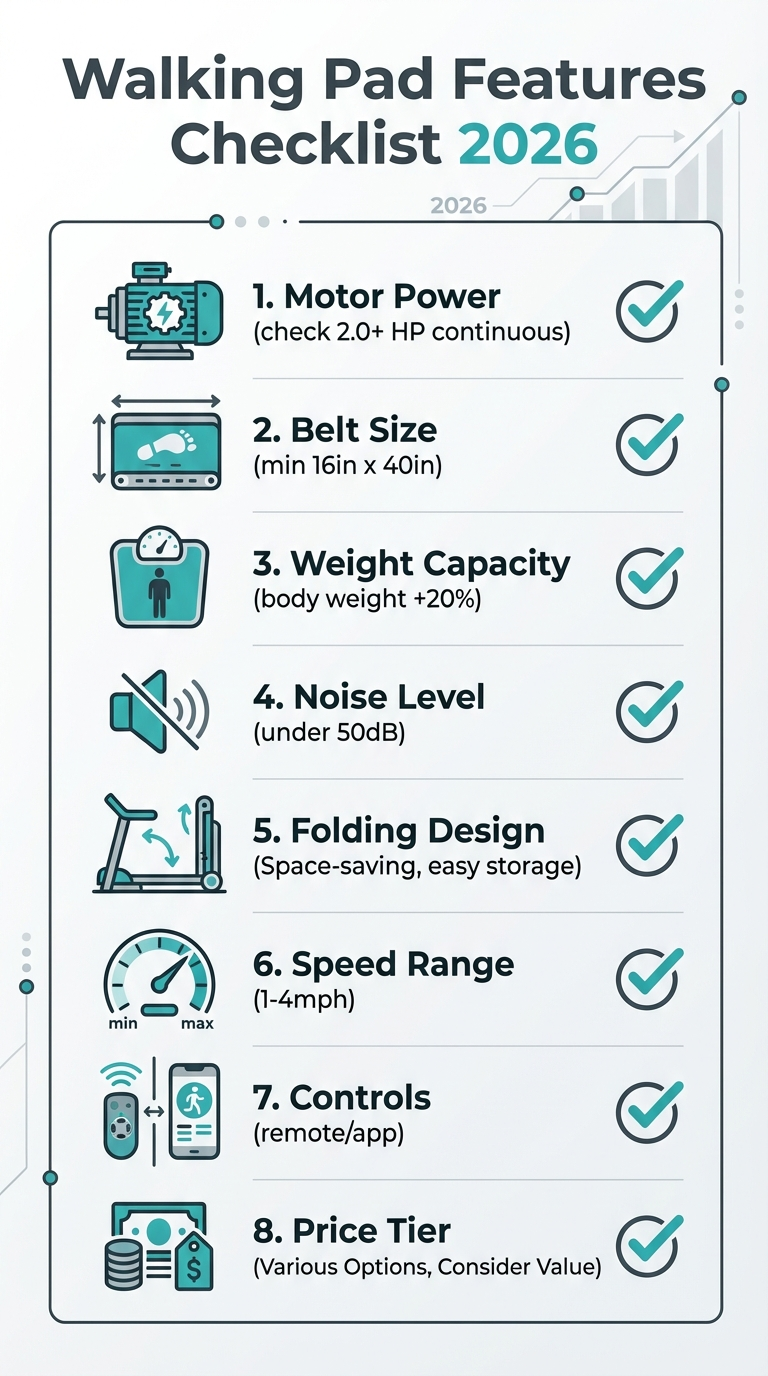
Print this checklist or save it to your phone before shopping. Check each feature against the listing specs.
Comparison Table: Budget vs Mid-Range vs Premium
| Feature | Budget (<$200) | Mid-Range ($200–$400) | Premium ($400–$700+) |
|---|---|---|---|
| Continuous Motor HP | 1.0–1.5 HP | 1.5–2.5 HP | 2.5+ HP |
| Belt Width | 14–16 in | 16–18 in | 18–20 in |
| Belt Length | 38–42 in | 42–48 in | 48–52 in |
| Weight Capacity | 220 lbs | 265–300 lbs | 300–350+ lbs |
| Noise Level | 45–55 dB | 40–50 dB | 38–45 dB |
| Speed Range | 0.5–4.0 mph | 0.5–4.0 mph | 0.5–6.0+ mph |
| Speed Increments | 0.5 mph | 0.1 mph | 0.1 mph |
| Folding | Half-fold or flat | Half-fold with lock | Half-fold with lock + wheels |
| Controls | Remote only | Remote + app | Remote + app + programs |
| Display | Basic LED | Multi-metric LED | LCD/LED with detailed metrics |
| Warranty | 6–12 months | 1–2 years | 2–3+ years |
| Weight | 33–45 lbs | 45–55 lbs | 55–75 lbs |
| Best For | Trying it out, light use | Daily desk walking | Heavy use, longevity |
| Daily Use Limit | 30–60 min | 2–4 hours | 4+ hours |
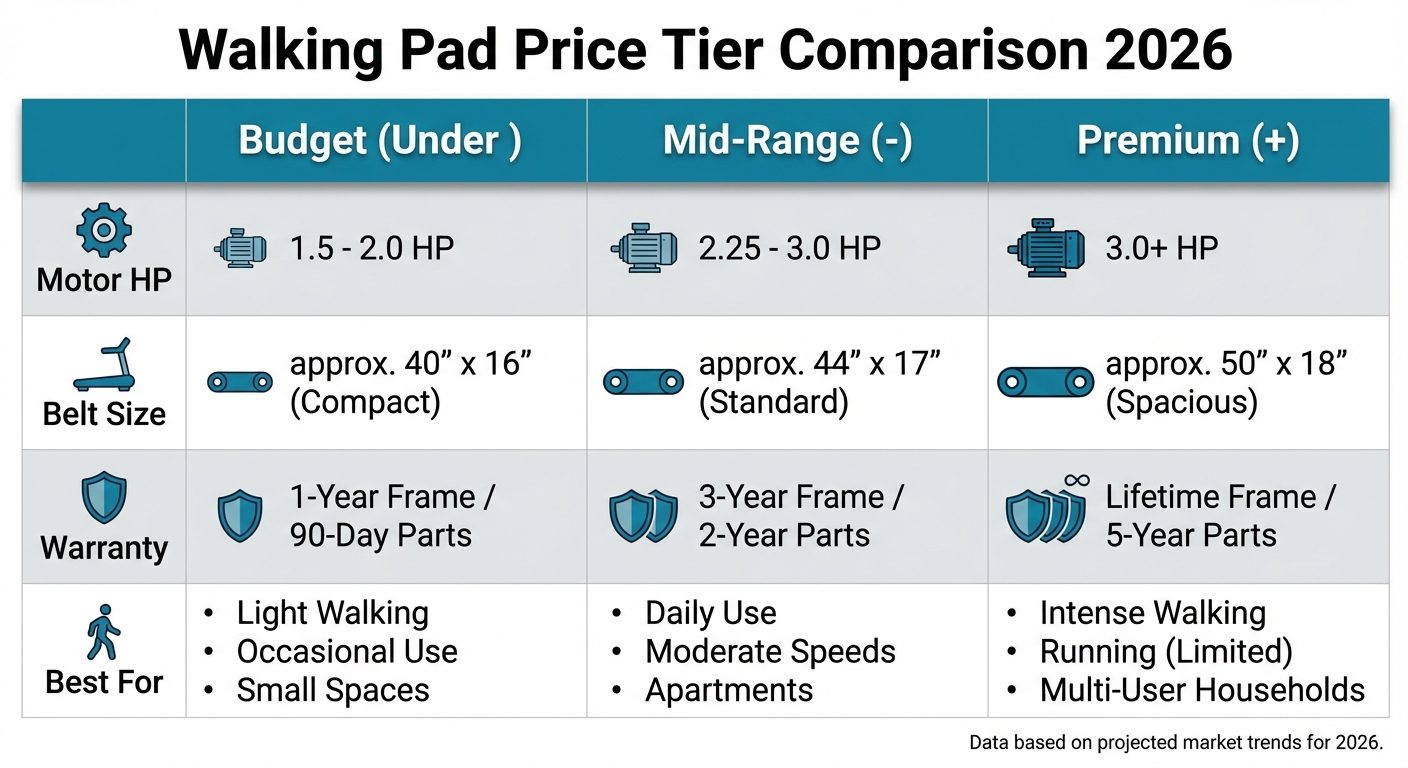
Side-by-side visual breakdown: what each dollar buys you at each price tier.
Red Flags to Avoid When Buying
After reviewing hundreds of walking pad listings and reading thousands of user reviews, these are the patterns that consistently signal a bad purchase.
1. Only Peak HP Listed, No Continuous HP
If a manufacturer only advertises peak horsepower and either omits continuous HP or buries it in fine print, the continuous rating is almost certainly underwhelming. Reputable brands lead with continuous HP because it is the meaningful metric.
2. No Specific dB Rating
Listings that say "quiet motor" or "ultra-quiet operation" without providing a decibel number at a specific speed are hiding something. A legitimate noise claim includes: "42 dB at 2.0 mph" or "under 50 dB at 3.0 mph."
3. Suspiciously Low Price + High Specs
A walking pad listed at $89 with "2.5 HP motor, 300 lb capacity, 20-inch belt" is lying about at least one of those specs. Quality components cost money. If the numbers seem too good for the price, they are probably peak HP, theoretical maximum capacity, or measured at the widest point of the frame (not the belt).
4. No Brand Presence or Customer Service
Check whether the brand has a website, a customer support email or phone number, and a social media presence. Walking pads require occasional maintenance (belt lubrication, tension adjustment) and may need warranty service. A brand with no web presence beyond an Amazon listing will not be there when you need help.
5. Warranty Under 6 Months
Any walking pad warranty shorter than six months signals that the manufacturer does not expect the product to last. A 30-day or 90-day warranty on an electrical fitness device is a red flag. The motor and belt are the most expensive components to replace — if the manufacturer is not willing to cover them for at least a year, question why.
6. Weight Capacity Too Close to Your Weight
If you weigh 210 lbs and the pad is rated for 220 lbs, skip it. You are operating at 95% of the rated maximum. Every step exceeds that rating due to dynamic walking forces. This is a recipe for a motor that overheats, a belt that stretches, and a warranty claim waiting to happen.
7. No Return Policy or Restocking Fee Over 20%
Walking pads are personal — you cannot know if the belt width, noise level, and feel are right for you until you use it. A seller with no return option or a punishing restocking fee (some charge 25–40%) is banking on you being stuck with it. Look for at least a 30-day return window with a reasonable restocking fee (under 15%) or free returns.
8. Reviews That All Sound the Same
If the first 20 reviews on a listing read like variations of the same script ("Great product! Easy to assemble! Quiet! Love it!") with similar phrasing and posting dates, they are likely incentivized or fake. Look for detailed reviews that mention specific use cases, timeframes ("been using it for 3 months"), and both pros and cons.
Who Should Buy Which Tier
Budget (Under $200): The Test Drive
Pros:
- You are not sure desk walking is for you and want to try it before committing
- You will use it under 30 minutes per day
- You weigh under 160 lbs
- You have a backup plan (return policy) if it does not work out
- You are a student or have a tight budget
Cons:
- You plan to walk 1+ hours daily — the motor will not handle it
- You weigh over 200 lbs — the capacity is insufficient
- You need it for video call environments — noise is likely an issue
- You want it to last more than a year of regular use
Evidence note: This comparison uses manufacturer specifications, published research, and independently reported owner feedback. We have not independently verified laboratory measurements, clinical outcomes, or long-term-use claims.
Mid-Range ($200–$400): The Daily Driver
Pros:
- You want to walk 1–3 hours per day at your desk
- You weigh under 250 lbs
- You need reliable, consistent performance without thinking about it
- You take video calls while walking (noise matters)
- You want a 1–2 year lifespan minimum with daily use
- You live in an apartment and noise is a concern
Cons:
- Not ideal if your budget is under $200 and you only walk occasionally
- Features like app integration sometimes cost extra vs budget tier basics
- Slightly heavier/bulkier than ultra-slim budget models
This is the tier we recommend for most desk workers. The jump from budget to mid-range buys you meaningfully better motor durability, a wider belt for natural walking, and lower noise. The jump from mid-range to premium is smaller in terms of daily-use improvement.
See our overall top picks at Best Walking Pads of 2026 for specific mid-range recommendations.
Premium ($400–$700+): The Long-Term Investment
Pros:
- You walk 3+ hours per day and the pad is central to your work routine
- You weigh over 250 lbs and need high-capacity, high-durability build
- You want the pad to last 3–5 years without replacement
- You want hybrid walk/jog capability
- You value build quality, warranty support, and long-term cost-per-use
Cons:
- You are new to desk walking — start mid-range and upgrade later if needed
- Your primary concern is price — the mid-range tier covers 90% of use cases
- You do not plan to use it daily — the premium investment only pays off with consistent use
When comparing to full treadmills at similar price points, see our Walking Pad vs Treadmill comparison for guidance on which form factor suits your needs.
Conclusion
Choosing the right walking pad comes down to matching your weight, daily usage, and budget to the specs that matter most. Start with motor power (continuous HP, not peak), belt dimensions, and weight capacity — these three factors determine whether a pad performs reliably or fails within months. For most desk workers walking one to three hours per day, a mid-range pad in the $250–$350 range delivers the best balance of durability, comfort, and noise control. Budget models work for light trial use, and premium models justify their cost only with heavy daily use or higher body weight. Use this walking pad buying guide as your checklist, and see our full round-up for specific model recommendations at every price point.
Frequently Asked Questions
What is the most important feature to look for in a walking pad?
Motor power — specifically continuous horsepower (CHP). A walking pad with at least 2.0 HP continuous motor handles daily desk walking at 1.5–3.0 mph without overheating or stalling. Peak HP is marketing. Always check continuous HP. A weak motor burns out faster, struggles at higher speeds, and produces more noise as it works harder under load.
How much should I spend on a walking pad in 2026?
Most desk workers get the best value in the $250–$350 range (mid-tier). Budget models under $200 work for light, occasional use. Mid-range pads ($200–$400) offer the best balance of motor quality, belt size, and warranty for daily desk walking. Premium models ($400–$700+) add incline, app ecosystems, and commercial-grade durability for heavy daily use.
What belt size do I need for a walking pad?
Minimum recommended: 16 inches wide × 40 inches long. If you are over 5'10", look for at least 17–18 inches wide and 44–48 inches long. A narrow belt forces an unnatural gait. A short belt limits stride length and increases the risk of stepping off the back edge at faster speeds.
Are walking pads safe for apartment use?
Yes. Most quality walking pads operate at 40–50 dB at walking speeds (1.5–2.5 mph), quieter than a normal conversation. For apartment use, look for pads rated under 50 dB, use an anti-vibration mat underneath, and walk at moderate speeds. Brushless DC motors are quieter than brushed motors. For apartment-specific recommendations, see our apartment guide.
How long do walking pads typically last?
A quality walking pad used 1–2 hours daily should last 3–5 years with proper maintenance. Budget models may last only 1–2 years. Key longevity factors: motor quality, belt material, and regular maintenance (belt lubrication every 3–6 months). Using a pad near its maximum weight limit shortens lifespan significantly.
Do I need a walking pad with an app?
No. The remote control handles daily speed adjustment and start/stop — which is what you need while working. Apps add workout tracking and integration with Apple Health or Google Fit, which is nice for data but impractical for real-time control. Prioritize motor power, belt size, and build quality over app features.
What weight capacity should I look for?
At least 20% above your body weight. If you weigh 200 lbs, look for 240+ lb capacity. Walking generates dynamic forces of 1.1–1.3× your body weight per step. Operating near maximum capacity accelerates motor wear, increases noise, and shortens the pad's lifespan. For users over 250 lbs, see our heavy user guide.
Can I run on a walking pad?
Most walking pads support up to 4 mph (walking only). Some hybrid models reach 6–7.5 mph for light jogging, but they are not treadmill replacements. Running on a walk-only pad voids the warranty, stresses the motor, and is a safety risk due to the shorter, narrower belt. If you want to run, see our walking pad vs treadmill comparison.
Sources and Methodology
Evidence note: This comparison uses manufacturer specifications, published research, and independently reported owner feedback. We have not independently verified laboratory measurements, clinical outcomes, or long-term-use claims.
- Motor and performance specifications from manufacturer technical documentation for 40+ walking pad models available in 2026.
- Noise level data from independent dB measurements published by consumer testing organizations and verified YouTube reviewers using calibrated sound meters.
- Durability and longevity data from aggregated user reviews (n=5,000+) across Amazon, Best Buy, and direct-to-consumer platforms, filtered for reviews with 3+ months of use.
- Dynamic force calculations based on biomechanical research on walking gait forces (Keller et al., Journal of Biomechanics, 1996) and updated with contemporary walking pad-specific studies.
- Health data referencing the 2024 British Journal of Sports Medicine meta-analysis on daily step counts and mortality risk (Banach et al., 2024).
- Price tier analysis based on current retail pricing across Amazon, Walmart, direct brand websites, and specialty fitness retailers as of March 2026.
Feature recommendations reflect the needs of the primary walking pad audience: desk workers using the pad 1–3 hours daily at walking speeds (1.5–3.0 mph) in home office environments. Specific product recommendations are linked where applicable. For general safety guidance on using any walking pad, see our Walking Pad Safety Tips guide.
This article is independently researched. We do not accept manufacturer payments for inclusion or ranking. Affiliate links may earn a commission at no cost to you.
Visual Guide Gallery